
Shoom・AI Music Video Generator
TECH ALPHA DMCCMusic & Audio
4.22.67K Reviews
- Version
- 1.28.10
- Installs
- 1.00M
- Age Rating
- Everyone
Screenshots

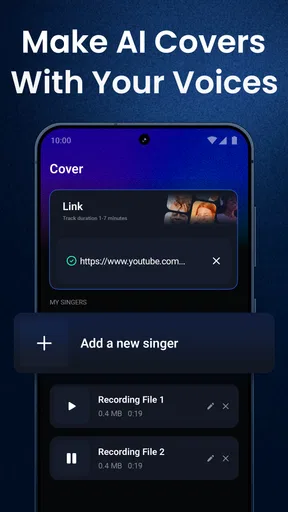
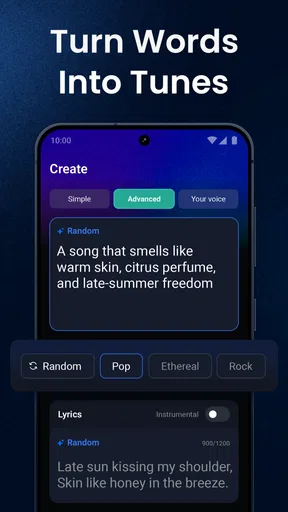
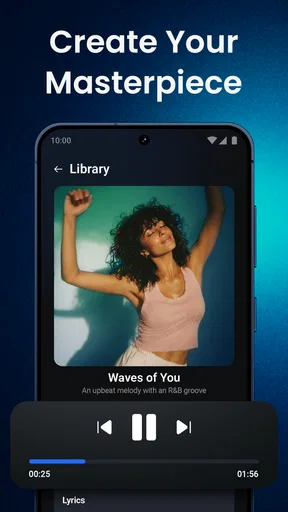


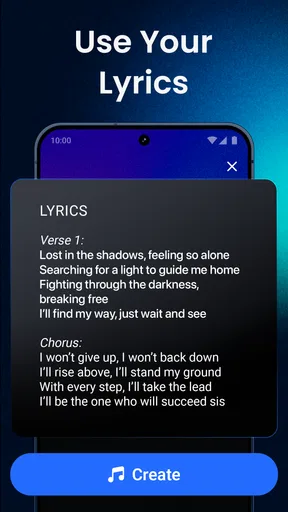

Our Review of Shoom・AI Music Video Generator
 Analysis by Appyee
Choosing an AI music app comes down to what you want to make and how much control you need. If I’m looking for a quick way to turn a loose idea into something I can listen to, Shoom - AI Music Generator is appealing because it puts generation ahead of the steep learning curve of a traditional digital audio workstation. It is a music and audio app from TECH ALPHA DMCC, and the basic idea is approachable: guide a song-making tool with a few choices rather than begin with a blank timeline and a pile of unfamiliar controls.
That difference matters most when the goal is exploration, not a finished studio production. I would consider Shoom for a playful backing track, a musical sketch, or a starting point when I know the mood I want but not the notes. I would not choose it as my main tool for detailed recording, precise editing, or a project that depends on reproducing a specific arrangement. Those jobs are usually better served by a conventional music-making app, where you can work directly with recordings, instruments, and editing controls.
Decide by the kind of music-making you want
Shoom is free to install and is rated for Everyone, so it is easy to try without treating the first session as a major commitment. It has a 4.0 average from around 9,800 ratings, with about 1,800 written reviews, and has passed 500,000 installs. Those figures suggest a sizeable audience, but I would still judge it by whether its creative approach fits you. The current version is 1.18.4, and it requires Android 12 or later.
The app’s appeal is immediacy. Instead of learning music theory first, I can choose a direction and listen to what the generator produces. That makes it a sensible starting place for someone who wants to experiment on a phone, or for a more experienced musician who needs a fast prompt for a new idea. But AI-generated music is not the same thing as having complete authorship over every note. If you need exact control, treat the output as inspiration rather than a finished arrangement.
Where the guided approach helps
The most useful way to approach a generator like this is to make each choice with a purpose. A genre gives the track a broad musical frame; a mood narrows the feeling. I would avoid changing several creative directions at once when testing it. Keeping one choice steady while trying another makes it easier to hear what actually changed and to decide which result is worth keeping.
That method is especially handy in small everyday windows. Imagine having a few minutes before a video call, wanting a light tune for a personal project, or simply being curious about how a prompt might sound when turned into music. A quick generation can make the idea tangible without requiring instruments or a long setup. For a serious release, though, I would listen critically and check whether the result suits the project instead of assuming that a polished first impression means it is ready to publish.
When another kind of app is a better fit
Compared with a traditional mobile DAW, Shoom’s strength is that it asks less of the user at the outset. A DAW is the better choice when I want to record a vocal, place notes precisely, edit a timeline, or build a track from parts I have made myself. Compared with a simple loop or beat-making app, Shoom is more interesting when I want the system to generate a broader musical idea rather than assemble a rhythm from preset blocks. These are differences in workflow, not a claim that one kind of app is always better.
There is also a useful middle ground: use generated music to get unstuck, then move to a more hands-on tool if the idea deserves detailed work. That approach avoids expecting one phone app to serve as both an instant creative prompt and a complete production environment. If your priority is precise control, recording your own performance, or learning how musical parts fit together, the more manual alternative will probably be more satisfying from the start.
Before committing to a workflow, I would also check the practical fit: whether the app runs on your device, whether you are comfortable creating through guided choices, and whether the free experience gives you enough room to experiment. Shoom is available at no upfront cost, while in-app purchases range from $1.99 to $39.99 per item. I would try it first, then decide whether any paid option addresses a need I actually have rather than paying simply because more choices sound appealing.
What to keep in mind while creating
One practical tip is to think of a generated track as a draft with a particular use, not just as a song to judge in isolation. Ask whether it would work under a short clip, set a mood for a personal project, or help you explore a style. This makes it easier to notice if the result is useful even when it is not the exact piece you imagined. It also gives you a clearer reason to keep experimenting instead of endlessly generating tracks without a goal.
Another trade-off is convenience versus authorship. A generator can help me move past the intimidating blank page, but a broad prompt may leave important details to the system. If the melody, structure, or sound needs to be unmistakably mine, I would rather use a tool that exposes those decisions directly. Shoom makes more sense when speed and curiosity matter more than meticulous control.
Sharing is another decision worth making deliberately. A track that works as a private experiment may not be the right fit for a public post or a project with specific creative requirements. I would listen from beginning to end, consider the intended context, and avoid treating social feedback as proof that a track is suitable for every use. That quick review is a small step, but it helps separate casual fun from work where details matter.
For a first session, I would keep the goal modest: choose a musical direction, generate an idea, and decide what you would change if you had more control. That last question is surprisingly useful. If the answer is “I want a different mood,” a guided generator may still suit you. If it is “I need to edit this exact section and record my own part,” you have learned that a more hands-on production app is probably the better next step.
There is no need to arrive with formal musical knowledge to explore the app, but beginners should still expect to make choices and listen thoughtfully. A genre label can point the result in a general direction; it cannot guarantee that every generated track will match a very specific reference in your head. Experienced musicians may enjoy the speed as a source of prompts, yet could find the limited sense of direct authorship frustrating if they expect to shape every detail inside the same workflow.
Getting Tuned In
Downloading and setting up Shoom was a breeze. Available on both Android and iOS, it doesn’t require any fancy equipment or prior expertise in music. The app’s interface is clean and straightforward, which is something I appreciate right off the bat. You’re greeted with a home screen that offers various options to start creating your melody.
The process begins with selecting a genre—whether you’re into electronic, pop, classical, or jazz, Shoom has you covered. Once you’ve picked your genre, the app lets you choose the mood or vibe you’re going for. Feeling like creating something upbeat or perhaps something more mellow? It’s all there, just a few clicks away.
Crafting Your Masterpiece
Once the genre and mood are set, the app’s AI takes over and begins crafting a unique piece of music. I was pleasantly surprised by how quickly it generated a track. In less than a minute, I had a complete melody ready to listen to. The quality of the compositions is impressive, sounding fresh and polished, almost as if produced by a seasoned musician.
One neat feature is the ability to tweak elements of the track. You can adjust the tempo, add instruments, and even layer multiple tracks to create a richer sound. For someone like me, who’s not a pro but likes to experiment, this level of customization is incredibly satisfying. I’d use those adjustments one at a time when refining an idea: changing the tempo first, for example, makes it easier to tell whether a track needs more energy before adding another instrument or layer.
Sharing the Groove
Once your track is ready, Shoom makes it super easy to share your creation. Whether you want to impress your friends on social media or keep it as your personal ringtone, the app offers seamless integration with various platforms. I uploaded my first track to Instagram, and the feedback was overwhelmingly positive. Who knew I had a hidden talent?
Moreover, for those interested in collaboration, the app allows you to share your tracks with other users. It’s a wonderful way to connect with fellow music enthusiasts and possibly even co-create something spectacular. The community vibe within the app adds a social element that makes the experience even more enjoyable.
A Few Notes of Caution
Despite all the fantastic features, there were a couple of hiccups. The app occasionally crashes, especially when dealing with larger files or more complex compositions. While it’s not a dealbreaker, it can be a tad frustrating if you’re in the middle of creating something magical. Hopefully, future updates will address this issue. Because a crash can interrupt creative momentum, I’d keep early experiments simple and avoid relying on a complicated in-progress track as the only copy of an idea I care about.
Another thing to note is that while the free version offers a good taste of what Shoom can do, unlocking its full potential requires a subscription. The premium version provides access to more genres, moods, and customization options, so if you’re serious about your music-making journey, it might be worth the investment. Since in-app purchases vary in price, I would look at the options inside the app before deciding; the right question is whether a particular unlock solves a real limitation in your own workflow.
The Final Chord
All in all, Shoom - AI Music Generator is a delightful app for anyone interested in creating music without the usual hassle. Whether you’re a budding musician or just someone who enjoys experimenting with sounds, this app offers an easy and fun way to explore your musical side. With its user-friendly interface and powerful AI capabilities, it’s a great tool to have at your fingertips. So why not give it a spin? You might just surprise yourself with what you’re able to create.
My recommendation is to try it when you want a quick, low-pressure route from a musical hunch to something you can hear. It is especially suited to curious beginners, casual creators, and musicians looking for a prompt rather than a replacement for their usual tools. If you need exact editing, dependable long-session production, or complete control of every musical decision, start with a conventional production app instead. For everyone else, Shoom is worth exploring as a playful sketchpad—just keep your expectations focused on discovery, and choose paid extras only when they clearly improve the way you create.
Verdict
Strengths of Shoom・AI Music Video Generator
- Generates unique music effortlessly.
- User-friendly interface for easy navigation.
- Wide variety of genres available.
- High-quality audio output.
- Fast processing and download times.
Limitations of Shoom・AI Music Video Generator
- Limited customization for advanced users.
- Requires internet for full functionality.
- Occasional minor bugs during playback.
- Subscription needed for premium features.
- Limited offline capabilities.
Similar Picks in This Category
View All
YouTube Music
Google LLC4.4

Samsung Music
Samsung Electronics Co., Ltd.3.8

Spotify: Music and Podcasts
Spotify AB4.3

JioSaavn - Music & Podcasts
Saavn Media Limited4.3

Lark Player:Music Player & MP3
Lark Player Studio - Music, MP3 & Video Player4.6

StarMaker: Sing Karaoke Songs
SKYWORK AI PTE. LTD.4.3
Frequently Asked Questions
What is Shoom - AI Music Generator and how does it work?
Shoom - AI Music Generator is an innovative app that creates music tracks using artificial intelligence. It allows users to select from various genres and upload personal sound clips or samples. The AI then generates unique compositions, offering an intuitive interface for both novice and experienced music creators.
Is Shoom - AI Music Generator free to use?
The app offers a free version with basic features, allowing users to explore its capabilities. For access to premium features, such as additional sound libraries and advanced AI options, users can opt for a subscription model. This ensures a flexible experience depending on your musical needs.
What are the system requirements for installing Shoom?
Shoom is compatible with both Android and iOS devices. For Android, it requires version 8.0 or higher, whereas iOS devices need to run on iOS 12.0 or later. It’s important to have a stable internet connection to download additional sound packs and ensure seamless AI processing.
Can I export and share the music I create with Shoom?
Yes, Shoom allows users to export their musical creations in multiple formats, such as MP3 and WAV. You can share your tracks directly to social media platforms, or save them to your device for further editing. This makes it easy to collaborate or gather feedback from others.
Does Shoom require musical expertise to create quality tracks?
No, Shoom is designed for users of all skill levels. Its user-friendly interface and intelligent AI capabilities mean that even those with no musical background can generate professional-sounding tracks. However, experienced musicians will find advanced features that allow for more precise control and customization.
